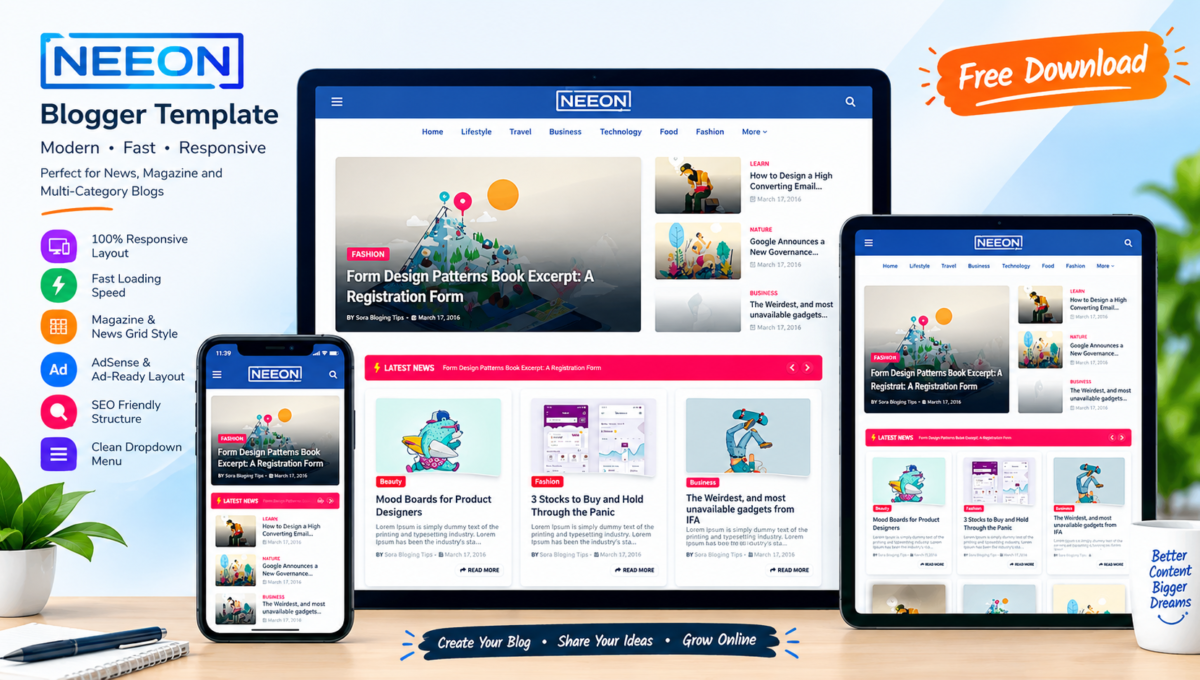
About This Blogger Theme
If you are planning to build a news website, magazine portal, or multi-category blog on Blogspot, selecting a structured layout is essential. The Neeon Blogger Template offers a modern, content-dense design built to present articles clearly while preserving fast page speeds.
In this article, we will go over its features, technical specifications, setup steps, and licensing terms to help you decide if it fits your website setup.

What is Neeon Blogger Template?
The Neeon Blogger Template is a magazine-style Blogspot theme crafted for content publishing. Designed specifically for news outlets, viral content sites, and tech reviews, it provides structured post blocks and distinct category sections that allow readers to browse multiple topics effortlessly.
Key Features of Neeon Blogger Template
Understanding a theme’s core capabilities helps you decide whether it aligns with your publishing workflow. Here is what Neeon includes:
- Fully Responsive Design: Adapts layout components smoothly across desktop monitors, tablets, and mobile screens.
- Magazine Content Layout: Features structured post grids and block sections ideal for organizing multiple categories on the homepage.
- Lightweight Code Architecture: Written using clean HTML5 and optimized code to ensure quick page renders and low bounce rates.
- SEO-Ready Foundation: Pre-configured with structured heading hierarchy to assist search engine crawlers in understanding content.
- AdSense & Banner Ready: Integrated ad widget areas in the header, post body, and sidebar to place monetization scripts easily.
- Dropdown Navigation: Clear navigation menu system allowing easy navigation through primary categories.
Why Consider Neeon Blogger Template for Your Site?
Using a well-structured magazine theme like Neeon provides a professional presentation for multi-topic publishing. A responsive layout helps keep mobile traffic engaged. However, actual search visibility and long-term reader retention depend on creating original, well-researched content.
If you want to compare this layout with minimalist alternative designs on our platform, check out our review of the Mitti Blogger Template Free Download for a simple personal blogging layout.
Template Specifications & Compatibility
| Theme Name: | Neeon Blogger Template |
| Original Developer: | SoraTemplates / WayTemplates |
| Platform: | Google Blogger / Blogspot Engine |
| Layout Type: | Multi-Column (Magazine Layout + Right Sidebar) |
| File Format: | XML Document (.xml) |
| Device Support: | Mobile, Tablet, Desktop Fully Responsive |
Pros and Cons
Pros:
- Rich homepage layout options for displaying multiple post categories.
- Straightforward configuration managed directly through the Blogger Layout panel.
- Optimized mobile layout ensuring readable text and accessible navigation buttons.
Cons:
- The free edition requires maintaining original developer credits in the footer.
- Setting up complex homepage widgets requires configuring specific label tags in the Layout tab.
How to Download Neeon Blogger Template
Disclaimer & Developer Credit: This template is shared for review, evaluation, and informational purposes. Users using the free version must retain the original footer attribution links inside their Blogger layout as per standard usage terms.
Download Neeon Theme Package
Access the XML file directly via our internal file manager below.
Use the custom download box at the bottom of this page to obtain the file.
How to Install Neeon Blogger Template on Blogger
Applying this theme to your Blogspot website takes just a few steps. Follow these instructions:
- Download the theme ZIP package to your computer and extract it to locate the
.xmltemplate file. - Sign in to your Blogger Dashboard.
- Click Theme from the left sidebar menu.
- Click the down arrow next to “CUSTOMIZE” and select Backup (always save a copy of your existing theme first).
- Click the arrow again, choose Restore, and click Upload.
- Select the extracted
.xmlfile from your computer to complete the installation. - Go to the Layout tab to configure your header logo, menu categories, and sidebar widgets.
Frequently Asked Questions (FAQ)
Is Neeon Blogger Template free to use?
Yes, a free edition is available for general use, which includes the primary design layout along with developer footer credits.
Is Neeon Blogger Template responsive?
Yes, it utilizes modern responsive CSS techniques that scale page elements correctly across smartphones, tablets, and desktop displays.
Can I use Neeon Blogger Template for a news website?
Yes, it is specifically designed for news blogs, magazine hubs, tech portals, and multi-topic content platforms.
How do I install Neeon Blogger Template on Blogger?
Upload the extracted XML file using the Theme > Restore option inside your Blogger Dashboard.
Does Neeon Blogger Template support Google AdSense?
Yes, it includes designated HTML/JavaScript widget areas ready for pasting AdSense or custom ad network codes.
Conclusion
The Neeon Blogger Template is a strong choice if you need a flexible, magazine-style theme for a content-heavy Blogspot site. Its clean post organization and responsive framework offer a solid foundation to publish and scale your online publication.