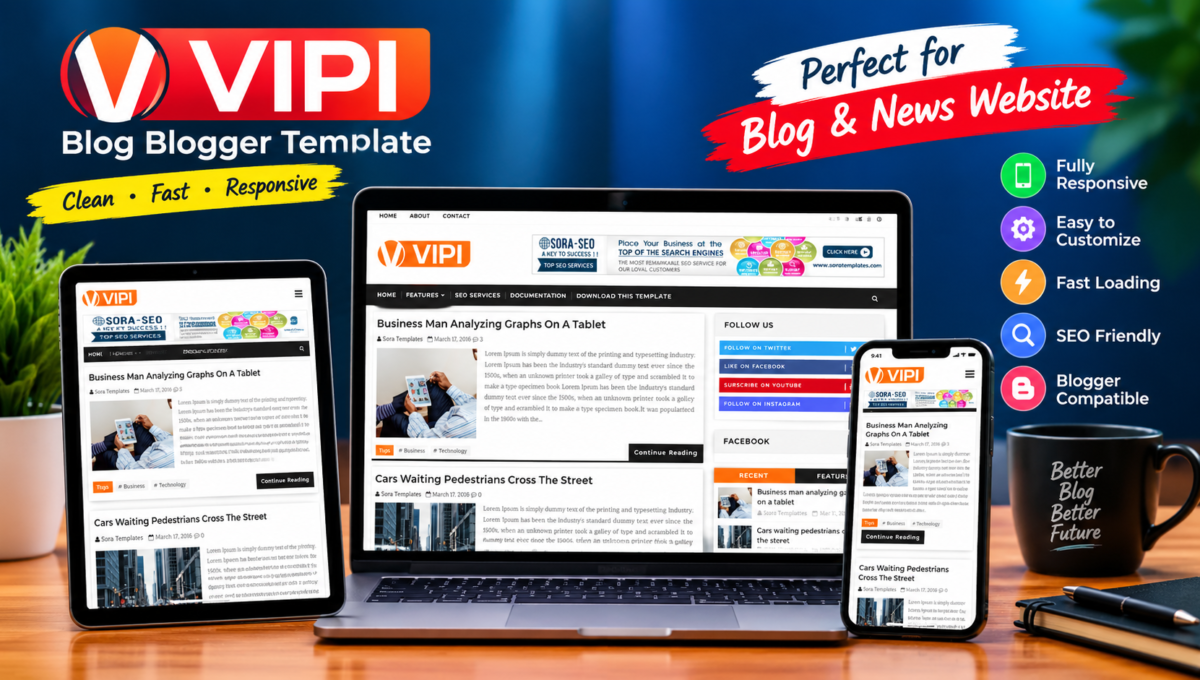
About This Blogger Theme
Finding a reliable and lightweight theme is an essential step when starting a new Blogspot website. The VIPI Blog Blogger Template offers a minimalist layout designed to deliver a smooth reading experience on both desktop and mobile screens while maintaining fast loading speeds.
What is VIPI Blog Blogger Template?
The VIPI Blog Blogger Template is a modern, content-focused theme designed specifically for the Google Blogger platform. Originally designed and developed by SoraTemplates / WayTemplates, this theme is built with a structured two-column layout, simple typography, and clean white space, making it ideal for personal blogs, niche guides, news snippets, and event publishing sites.
Key Features of VIPI Blog Template
Before installing any Blogger theme, it is vital to understand its core features and capabilities. The VIPI Blog theme comes equipped with essential options designed for modern blogging needs:
- Fully Responsive Layout: Automatically adjusts to desktop, tablet, and smartphone screens for optimal mobile readability.
- Inbuilt WhatsApp Share Option: Includes a mobile-friendly WhatsApp sharing button alongside traditional social media icons to boost content sharing.
- Lightweight Code Architecture: Uses optimized CSS and minimal JavaScript to ensure rapid page load speeds and lower bounce rates.
- Structured Breadcrumb Navigation: Pre-configured breadcrumb paths to help site visitors and search engine crawlers navigate pages easily.
- Widget-Ready Sidebar & Header: Built-in widget areas in the right sidebar, header, and footer for displaying categories, recent posts, and ad codes.
- Clean Dropdown Menu: Multi-level top navigation menu allowing easy navigation through primary content categories.
- Custom 404 Error Page: Features a clean error page design that keeps lost visitors on your site rather than leaving immediately.
- Fast Image Loading: Optimized image container styles prevent page shifting during load time.
Why Consider VIPI Blog for Your Site?
Selecting a clean and fast theme like the VIPI Blog Blogger Template provides a solid SEO-friendly foundation for your Blogspot site. Search engine crawlers prefer clean websites that load quickly without heavy script delays. While a good theme improves overall site performance and accessibility, search engine visibility and user engagement ultimately depend on creating original, high-quality content.
Furthermore, the clutter-free presentation ensures that your readers can browse through your content without distracting pop-ups or misaligned page sections.
If you are exploring other lightweight designs for your website, feel free to browse our collection of free responsive Blogger templates to find the best layout for your niche.
Template Specifications & Compatibility
Here is a quick overview of the technical specifications and compatibility details for the VIPI Blog theme:
| Theme Name: | VIPI Blog Blogger Template |
| Original Developer: | SoraTemplates / WayTemplates |
| Platform: | Blogger / Blogspot Engine |
| Layout Type: | 2 Columns (Content Area + Right Sidebar) |
| File Format: | XML Document (.xml) |
| Device Support: | Mobile, Tablet, Desktop Fully Responsive |
| Widget Support: | Fully Supported via Blogger Layout Tab |
Pros and Cons
Every theme has its strengths and limitations. Here is a clear breakdown to help you decide if this layout meets your requirements:
Pros:
- Fast and responsive framework suitable for mobile-first indexing.
- Easy to configure using the native Blogger Layout panel without editing raw code.
- Built-in social and messaging sharing tools for quick content promotion.
- Clean design that presents blog posts clearly.
Cons:
- Free version requires retaining original theme attribution links in the footer.
- Lacks built-in dark mode options without manual custom CSS edits.
- Limited native options for complex multi-grid homepages.
How to Download VIPI Blog Blogger Template
Disclaimer & Developer Credit: This template is created and copyrighted by its original authors (SoraTemplates / WayTemplates). We do not claim ownership of this design and share it for informational, review, and evaluation purposes only. As per the original developer’s terms, users using the free version must retain the original footer attribution links inside their Blogger layout.
You can access the template file directly through our website’s internal download manager below to obtain the compressed ZIP package containing the XML file.
How to Install VIPI Blog on Blogger
Installing a new theme on Blogger is a straightforward process. Follow these simple steps to apply the VIPI Blog template to your website:
- Download the theme file package to your device and extract the ZIP archive to locate the
.xmltemplate file. - Sign in to your Blogger Dashboard using your Google account.
- Select Theme from the left-hand navigation menu.
- Click the down arrow next to the “CUSTOMIZE” button and select Backup. Always save a copy of your current theme before making major changes.
- Click the down arrow again, select Restore, and click Upload.
- Choose the extracted
.xmlfile from your device to complete the upload process. - Navigate to the Layout tab in your dashboard to set up your navigation menus, sidebar widgets, and header layout.
Basic Customization Tips for VIPI Blog
Once you install the theme, you can perform a few basic setup steps to personalize it for your brand:
- Set Up the Main Menu: Go to Layout > Main Menu widget to add your primary site categories and pages.
- Configure Social Links: Add your profile links to the Social Header and Social Footer widgets.
- Place Ad Units: Insert your Google AdSense or ad network code scripts into the designated HTML/JavaScript widgets in the sidebar or post header areas.
Frequently Asked Questions (FAQ)
Is VIPI Blog Blogger Template free?
Yes, a free edition of the VIPI Blog Blogger Template is available for general use, though footer attribution credits to the original developer are included in the free version.
Is VIPI Blog responsive?
Yes, the theme is built using responsive design principles and adapts seamlessly to modern mobile browsers, tablets, and desktops.
Can I use VIPI Blog for a news blog?
Yes, you can use VIPI Blog for news snippets, personal journals, and niche content, though sites requiring heavy multi-category grids might prefer broad magazine layouts.
How do I install VIPI Blog on Blogger?
You can install it by uploading the extracted XML theme file through the Theme > Restore menu in your Blogger Dashboard.
Does VIPI Blog support mobile devices?
Yes, it supports all mobile browsers and includes touch-friendly social sharing features like direct WhatsApp messaging links.
Can I remove the footer links in the free version?
No, removing the attribution links in the free version may cause redirectional issues according to the developer’s license agreements.
Conclusion
The VIPI Blog Blogger Template offers a fast, practical, and minimalist layout for content creators seeking a clean Blogspot theme. Its lightweight structure and straightforward mobile responsiveness make it a reliable base for building and expanding your site’s content.